Generate Your Own Dog Images with AI
Create your own adorable dog images with our free AI image generator. It's fun and easy!
2 years ago
Dog
Created 2 years ago · 0 comments· 0 likes
DreamShaper v8
Creation Summary by Vincent
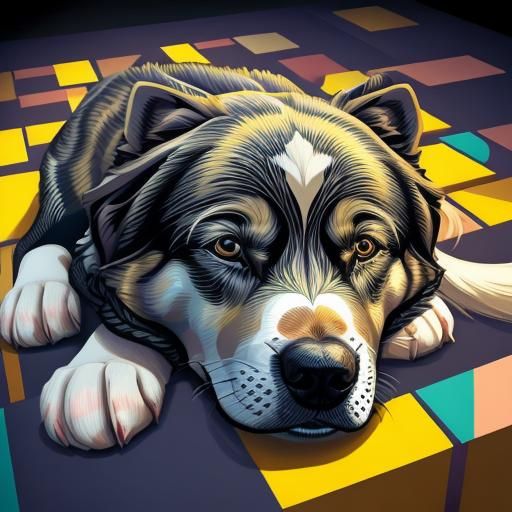
Sleeping Dog in Tessellation Cubist Art
A captivating image of a sleeping dog rendered in tessellation art. The artwork features cubist vector elements and intricate block patterns with light colors and chiaroscuro.
Created by Somei on Apr 1, 2024 using the DreamShaper v8 AI image generator model.
No comments yet
Be the first to respond!

No comments yet.
Creation Settings
- Text Prompts
- Beautiful sleeping dog in tessalation art art, cubist vector art, intricate block art, 8k, light colours, in style of M. C. Escher, chiaroscuroWeight: 1ugly, tiling, poorly drawn hands, poorly drawn feet, poorly drawn face, out of frame, extra limbs, disfigured, deformed, body out of frame, bad anatomy, watermark, signature, cut off, draft, Text, letters, writing, frame, boring, minimalist, bad qualityWeight: -0.8
- Model
 CKPT
CKPT- Initial Resolution
Thumb
- Aspect Ratio
1:1
- Runtime
Short
- Overall Prompt Weight
50%
- Sampling method
DDIM