
Create your own fantasy warrior images with AI
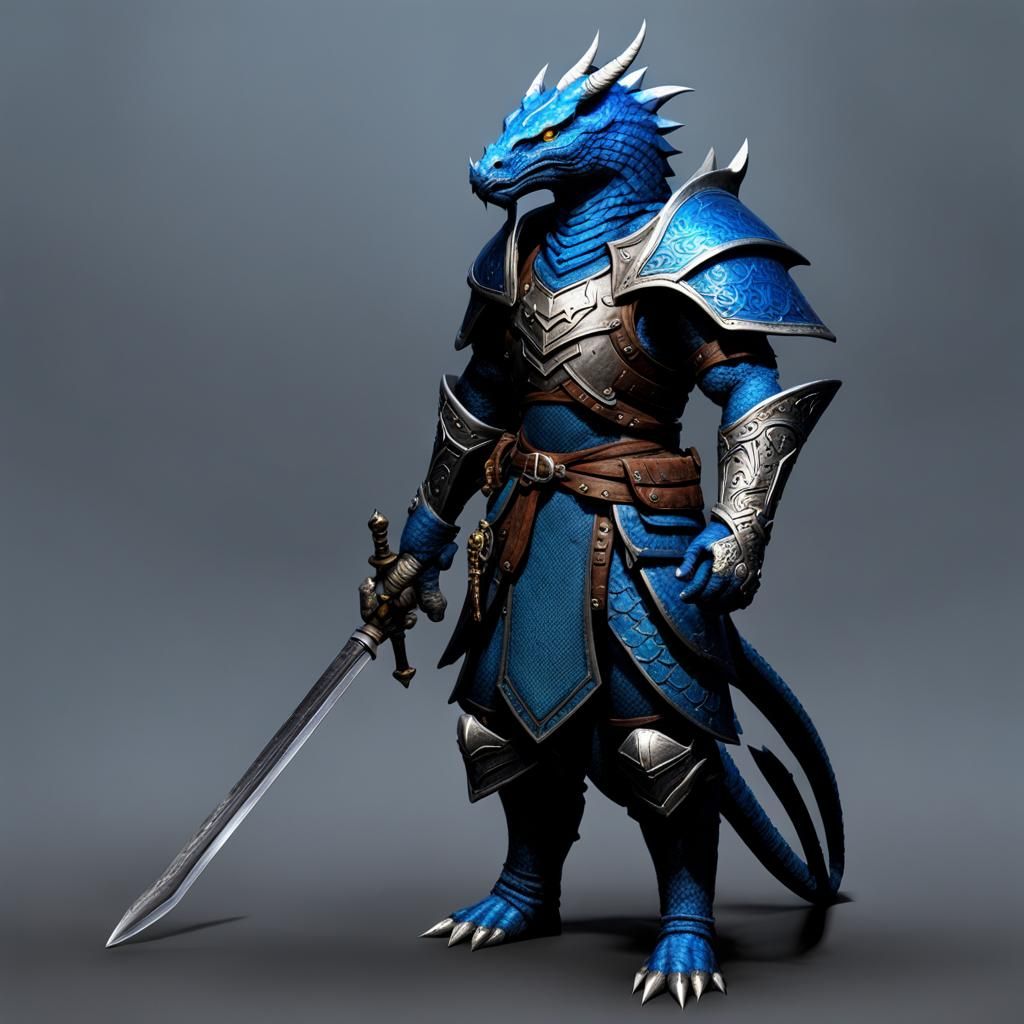
Easily generate your own fantasy warrior images, like a blue dragonborn, with our free AI image generator

2 years ago
Blue dragonborn without wings and tail, cloths covering almost its entire body and a sword on its back
Created 2 years ago · 5 comments· 0 likes
SDXL 1.0
Creation Summary by Vincent
Wingless Blue Dragonborn Warrior with Sword
This image shows a blue dragonborn warrior, lacking wings and tail, clad in concealing garments and carrying a sword. The figure is a powerful, yet mysterious character.
Created by Anonymous User on Feb 23, 2024 using the SDXL 1.0 AI image generator model.
5 Comments
Join the conversation

Creation Settings
- Text Prompts
- Blue dragonborn without wings and tail, cloths covering almost its entire body and a sword on its backWeight: 1ugly, tiling, poorly drawn hands, poorly drawn feet, poorly drawn face, out of frame, extra limbs, disfigured, deformed, body out of frame, blurry, bad anatomy, blurred, watermark, grainy, signature, cut off, draftWeight: -0.3
- Model
 CKPT
CKPT- Initial Resolution
Medium
- Aspect Ratio
1:1
- Runtime
Short
- Overall Prompt Weight
50%
- Refiner Weight
50%
- Sampling method
K_DPMPP_2M


Cool!